Migrating from Magento’s default Luma theme to Hyvä is one of the highest-impact frontend investments a Magento merchant can make. Stores that complete the migration consistently see meaningful improvements in Core Web Vitals, faster page load times, and measurable gains in organic traffic and conversion rates. But the path to those results is more involved than it looks— and merchants who approach it without a clear plan often encounter unexpected costs, broken extensions, and delayed timelines. This guide covers the full migration process, phase by phase, so you know exactly what to expect before you start.
Key Takeaways
- Hyvä replaces Magento’s Luma frontend entirely — cutting page weight from roughly 1.5 MB to 0.2 MB and loading just two files instead of 200+.
- Most migrations take 4–16 weeks depending on store complexity, extension count, and custom design work.
- The extension compatibility audit is the single most critical pre-migration step — skipping it is the most common cause of budget overruns.
- Hyvä does not change Magento’s backend, database, or admin — only the customer-facing storefront is rebuilt.
- Core Web Vitals improvements appear immediately after launch; full SEO impact takes 3–6 months.
- Bemeir is the first and only Hyvä Gold Partner in the USA and built Hyvä Widgets, now used by 250+ Magento stores.
Why Migrate to Hyvä?
Before diving into the process, it’s worth establishing what you’re actually migrating away from — and why it matters.
Magento’s default Luma theme was designed for flexibility, not performance. It loads over 200 JavaScript and CSS resources totaling roughly 1.5 megabytes. Its architecture relies on KnockoutJS, RequireJS, and jQuery — a stack of layered dependencies that creates deep loading chains even for simple interactions. On mobile, where Google tracks real-user performance for ranking, Luma stores routinely fail Core Web Vitals thresholds.
Hyvä replaces this entirely. According to Hyvä’s official documentation, it loads just two files — roughly 0.2 megabytes — built on AlpineJS and Tailwind CSS. The result is dramatically faster load times, cleaner HTML output, improved crawl efficiency, and meaningfully better scores across all three Core Web Vitals: LCP, INP, and CLS.
According to the HTTP Archive Core Web Vitals report, sites built on lightweight modern frameworks (such as those using AlpineJS and Tailwind) have a 70% higher pass rate for LCP (Largest Contentful Paint) than legacy Magento Luma sites.
The performance difference is architectural, not marginal. For merchants who have spent years trying to optimize their way out of Luma’s performance ceiling, Hyvä removes the ceiling entirely.
Luma vs. Hyvä: Technical Comparison
| Dimension | Luma (Default) | Hyvä |
|---|---|---|
| JS/CSS files loaded | 200+ | 2 |
| Page weight (approx.) | ~1.5 MB | ~0.2 MB |
| Frontend stack | KnockoutJS, RequireJS, jQuery | AlpineJS, Tailwind CSS |
| Core Web Vitals (mobile) | Routinely fails thresholds | Consistently meets “Good” range |
| Developer experience | Complex, layered dependencies | Modern, well-documented stack |
Stats above are taken from Hyvä’s published performance benchmarks.
What Hyvä Is and Is Not
Hyvä is a frontend theme replacement. It replaces Luma’s frontend layer — the HTML, CSS, and JavaScript that renders your storefront. It does not change Magento’s backend, database, or admin panel. Your products, orders, customers, configurations, and integrations remain completely intact.
This distinction matters because it shapes the migration scope: you’re rebuilding the customer-facing interface of your store, not re-platforming from scratch. That rebuild can still be significant, particularly if your store relies heavily on third-party extensions with their own frontend components.
Before You Start: What to Assess
No Hyvä migration should begin without a thorough discovery phase. The time you invest here directly reduces risk, cost, and surprises later.
Extension Compatibility Audit
This is the single most important pre-migration activity. Hyvä uses a fundamentally different frontend architecture than Luma, which means any extension that renders something visible in the storefront — a banner, a product widget, a custom checkout step, a search overlay — needs to be evaluated for compatibility.
Extensions generally fall into three categories:
- Fully compatible: The extension works with Hyvä out of the box, typically because it operates only in the backend or admin, or because the vendor has already built Hyvä compatibility.
- Compatible via compatibility module: The Hyvä ecosystem includes an official compatibility module library. Many popular extensions — especially those from Amasty, Mageworx, and other major vendors — already have Hyvä compatibility modules available.
- Requires custom development: Extensions that haven’t released Hyvä-compatible versions need their frontend templates rewritten. This is the primary driver of migration timeline and cost variation.
Your development team or agency should audit every installed extension against the Hyvä compatibility module repository before scoping the project. Backend-only extensions — ERP integrations, inventory management, order processing tools — generally require no changes. Storefront-facing extensions are where the work lives.
Custom Theme and Design Assessment
If your current store runs on a custom Luma child theme, that customization cannot be ported directly to Hyvä. Hyvä’s frontend stack is different enough that visual customizations — layouts, component templates, CSS overrides — need to be rebuilt rather than migrated. This is often an advantage: the rebuild is done in Tailwind CSS, which is more maintainable and performant than Luma’s approach.
Gather your brand guidelines, design assets, and any UI/UX specifications before the project starts. The clearer your design requirements, the faster the Hyvä theme build goes.
Magento Version Verification
Hyvä requires Magento 2.4.x. The current release is Magento Open Source 2.4.8. If your store runs on an older version — particularly Magento 2.3.x or earlier — you’ll need to complete a Magento upgrade before or alongside the Hyvä migration. Running both simultaneously is possible but adds complexity; for most merchants, completing the upgrade first and then migrating to Hyvä is the cleaner path.
Performance Baseline
Before any work begins, capture your current performance metrics. Run Google PageSpeed Insights and pull 28-day Core Web Vitals data from Google Search Console for your homepage, a category page, and a product detail page. Record these numbers. They’re your before/after comparison once the migration is complete — and essential for demonstrating ROI to stakeholders.
The Migration Timeline: Phase by Phase
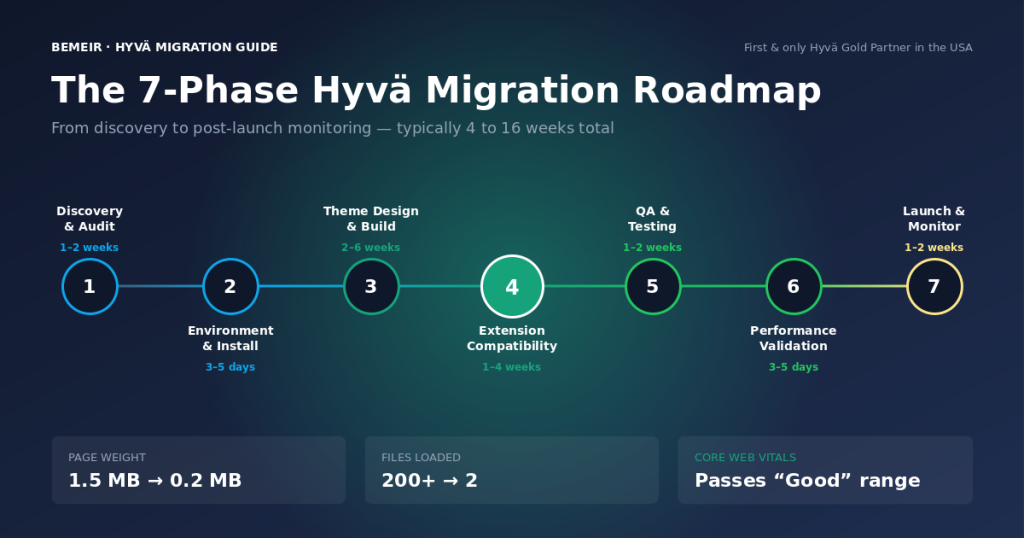
Hyvä migrations typically take between 4 and 16 weeks, depending on store complexity, extension count, and the degree of custom design work involved. Below is a realistic phase-by-phase breakdown.
| Phase | Activity | Typical Duration |
|---|---|---|
| Phase 1 | Discovery & Audit | 1–2 weeks |
| Phase 2 | Environment Setup & Hyvä Installation | 3–5 days |
| Phase 3 | Theme Design & Build | 2–6 weeks |
| Phase 4 | Extension Compatibility Work | 1–4 weeks (varies) |
| Phase 5 | QA & Testing | 1–2 weeks |
| Phase 6 | Performance Validation | 3–5 days |
| Phase 7 | Launch & Post-Launch Monitoring | 1–2 weeks |
Phase 1: Discovery & Audit (1–2 Weeks)
This is the most underestimated phase — and skipping it is the most common cause of budget overruns. A thorough discovery covers:
- Full extension audit with compatibility classification
- Custom theme review and design gap analysis
- Magento version and dependency check
- Performance baseline capture across key page types
- Checkout and payment flow documentation
- Third-party integration mapping: ERP, CRM, shipping, search
At the end of discovery, you should have a clear project scope, a realistic timeline, and an itemized estimate. Any agency that skips this phase and jumps straight to a fixed quote is not accounting for your actual complexity.
Phase 2: Environment Setup & Hyvä Installation (3–5 Days)
Hyvä requires a license, available directly from hyva.io. Hyvä license cost runs roughly €1,000–€3,000 per store domain depending on tier, with discounts available through partner agencies. Once obtained, installation is handled via Composer. Your development team sets up a dedicated staging environment — a separate copy of your store where all migration work happens, completely isolated from your live site.
The Hyvä base theme is installed alongside its compatibility module library. At this stage, your store will look broken in the staging environment — that’s expected. Hyvä has replaced the frontend rendering layer, but the theme design and extension compatibility work hasn’t been done yet.
This is also when the Hyvä checkout decision is made. Hyvä ships with a modern, lightweight checkout replacement for Magento’s default checkout. If your store uses a heavily customized checkout or a third-party checkout extension, the team will need to evaluate whether to adopt the Hyvä checkout or implement compatibility with your existing checkout flow. This decision affects both timeline and cost.
Phase 3: Theme Design & Build (2–6 Weeks)
This is the core creative and development phase. The Hyvä theme is built from the ground up using Tailwind CSS and AlpineJS — not ported from Luma. Developers build out:
- Global layout: header, navigation, footer
- Homepage and content page templates
- Category and product listing pages
- Product detail page (PDP)
- Shopping cart and mini-cart
- Customer account pages
- Search results and filtering — typically with a Hyvä-compatible layer such as Meilisearch or Algolia
Timeline for this phase is driven primarily by design complexity. A clean implementation of an existing brand with well-documented design guidelines can move through this phase in two to three weeks. Custom UI components, complex navigation patterns, or significant departure from standard Magento page types can push this to six weeks or more.
Phase 4: Extension Compatibility Work (1–4 Weeks)
How long this phase takes depends entirely on what your extension audit found. For stores where most extensions already have Hyvä compatibility modules available, this phase is relatively quick — primarily installing and configuring those modules. For stores with custom or older extensions that lack Hyvä compatibility, developers need to rewrite the frontend templates for those extensions.
Extensions to prioritize, in order of business impact:
- Payment gateways: Stripe, Braintree, PayPal, Klarna, and most major payment providers either have native Hyvä support or official compatibility modules. Verify yours early.
- Search and filtering: If you use OpenSearch, Algolia, Klevu, or Meilisearch, check for Hyvä-compatible versions. Search is high-visibility and high-impact. Note: Magento 2.4.7+ requires OpenSearch — not Elasticsearch.
- Checkout customizations: Any custom checkout steps, upsell modules, or gift messaging extensions that touch the checkout flow need careful evaluation.
- Product display modules: Custom product labels, badges, comparison tools, and review widgets all render in the storefront and need compatibility work if not already supported.
- Marketing and analytics: Tag Manager implementations and analytics events are generally handled in JavaScript separate from the frontend theme — less affected, but worth reviewing.
A well-managed extension audit at the start of the project means no surprises here. Teams that skip the audit often discover incompatible extensions mid-build — which disrupts schedules and inflates costs.
Phase 5: QA & Testing (1–2 Weeks)
Thorough quality assurance is non-negotiable before any Hyvä migration goes live. Testing covers:
- Functional testing: Every core user flow — browsing, search, add to cart, checkout, account creation, order history — verified on desktop and mobile.
- Cross-browser testing: Chrome, Safari, Firefox, and Edge at minimum. Mobile Safari on iOS and Chrome on Android are critical given Google’s mobile-first ranking.
- Extension functionality: Every extension verified to work correctly within the new theme.
- Performance testing: Core Web Vitals measured against the pre-migration baseline to confirm improvement.
- Regression testing: Confirming that backend processes — order processing, inventory sync, pricing rules — remain unaffected.
This phase often reveals minor styling inconsistencies, edge cases in mobile navigation, or compatibility gaps with less commonly tested extension interactions. Budget time for fixes — one to two iteration cycles of QA is normal for a clean migration.
Phase 6: Performance Validation (3–5 Days)
Before launch, validate performance against your pre-migration baseline. The target is meaningful improvement across Core Web Vitals — not just passing Lighthouse scores. Google’s Lighthouse score and real-user Core Web Vitals are not the same measurement. Optimize for the latter.
Use Google PageSpeed Insights to test against real Chrome user data where available. For a staging environment without real traffic, GTmetrix and WebPageTest provide reliable lab measurements. Record results for each key page type.
Well-executed Hyvä migrations routinely achieve LCP times under two seconds on mobile, INP under 200 milliseconds, and CLS under 0.1 — meeting Google’s “Good” threshold for all three metrics. If results fall short, this phase identifies what additional optimization is needed before going live.
Phase 7: Launch & Post-Launch Monitoring (1–2 Weeks)
Launch day on a Hyvä migration is less dramatic than a full re-platform, but it still requires careful execution. A solid launch plan includes:
- Maintenance mode: Enable Magento maintenance mode during the theme switch to prevent customers from seeing a partially-rendered store.
- DNS and cache flush: Clear Varnish and browser caches immediately after launch to ensure all users receive the new theme.
- Staged rollout: For high-traffic stores, consider routing a small percentage of traffic to the Hyvä version first to catch edge cases before full release.
- Monitoring: Set up real-time error monitoring — New Relic, Sentry, or equivalent — alongside Google Search Console and Analytics for the first 72 hours post-launch.
Edge cases in checkout flows, product type rendering, or account interactions sometimes only appear at scale. Having your development team on standby for the first week post-launch is strongly recommended.
Common Challenges and How to Handle Them
Every Hyvä migration is different, but certain challenges come up repeatedly. Being prepared for these avoids the scenarios where they derail timelines or budgets.
Extensions Without Hyvä Compatibility Modules
This is the most frequent source of scope surprises. When an extension your store relies on doesn’t have an official Hyvä compatibility module, developers must write a custom compatibility layer. This involves rewriting the extension’s frontend templates to use AlpineJS and Tailwind CSS instead of KnockoutJS and Luma’s CSS.
The right approach: identify these extensions in Phase 1, then make an informed decision — wait for the vendor to release a compatibility module, build the compatibility layer internally, or replace the extension with a Hyvä-native alternative. Improvising these decisions mid-build is expensive.
Heavily Customized Checkout Flows
Checkout is the highest-stakes page in your store. If your current Luma checkout has been significantly customized — custom steps, alternative payment flows, B2B-specific checkout logic — those customizations don’t transfer to Hyvä automatically.
Hyvä’s native checkout is excellent and significantly faster than Luma’s default. For most merchants, adopting it is the right call. If your checkout customizations are deeply tied to a third-party extension or a backend business process, assess carefully whether to adopt the Hyvä checkout or maintain your existing checkout architecture with Hyvä compatibility.
SEO Continuity During Migration
Because Hyvä changes your frontend HTML structure, it’s important to verify that your existing SEO signals are preserved. Key areas to audit:
- URL structure: Hyvä doesn’t change Magento’s URL routing, so product and category URLs remain unchanged by default. Verify that no custom URL logic is affected.
- Schema markup: Hyvä’s clean HTML structure makes schema implementation more straightforward. Verify that product schema, breadcrumb schema, and organization schema are correctly output after migration.
- Meta tags: Confirm title tags, meta descriptions, canonical tags, and hreflang attributes are rendering correctly on all page types.
- Robots and sitemap: No changes expected here since these are backend-generated, but verify as part of your QA process.
Hyvä migrations, when done correctly, consistently improve SEO performance because of the Core Web Vitals gains. A poorly executed migration — particularly one that removes structured data or breaks canonical tags — can cause short-term ranking disruption. QA your SEO output specifically.
Hyvä and Adobe Commerce B2B Stores
Merchants running Adobe Commerce B2B have additional considerations. Magento’s B2B module has its own frontend components — company accounts, shared catalogs, requisition lists, quick order, and negotiable quotes — built on Luma’s frontend stack. Hyvä’s compatibility with Adobe Commerce B2B has improved significantly and continues to expand, but B2B migrations require explicit verification of each B2B feature against Hyvä’s compatibility matrix.
Work with a Hyvä-certified agency that has direct experience with Adobe Commerce B2B migrations. The compatibility landscape changes as both Hyvä and Adobe Commerce release updates, and you need someone who tracks those changes actively.
What to Expect After Launch
A successful Hyvä migration delivers results that are visible relatively quickly — but the timeline for seeing different types of improvement varies.
| Timeframe | Expected Outcomes |
|---|---|
| Immediately | Core Web Vitals improvement visible in PageSpeed Insights and lab tests |
| 1–4 weeks | Bounce rate reduction as faster pages retain more visitors; early engagement improvements |
| 4–8 weeks | Google Search Console Core Web Vitals report updates with real user data from the new theme |
| 2–3 months | Organic ranking improvements as Google’s crawl reflects improved performance; conversion rate lift |
| 3–6 months | Full SEO impact visible; measurable revenue attribution from performance improvements |
Google’s Core Web Vitals data is collected over a rolling 28-day window. It takes roughly a month of real traffic before your Search Console reports fully reflect the new theme’s performance. Don’t judge SEO impact in the first two weeks post-launch — the data is still catching up.
Conversion rate improvements are often seen earlier, because users experience the faster storefront immediately. Faster product pages reduce abandonment. A faster checkout flow reduces cart abandonment at the final step. These gains don’t require waiting for Google to update its index.
Ongoing Maintenance with Hyvä
One of Hyvä’s most practical long-term advantages is developer experience. Tailwind CSS and AlpineJS are modern, well-documented technologies with large developer communities. Making visual changes, building new components, or extending the theme for new functionality is faster and more maintainable than the equivalent work in Luma.
When new Magento versions are released, Hyvä’s update process is generally direct — the Hyvä team actively maintains compatibility with Adobe Commerce release cycles. Keeping your Hyvä installation updated is part of routine maintenance, not a major project.
How to Choose the Right Partner for Your Migration
The agency you work with has more impact on your migration outcome than almost any other factor. Hyvä certification and hands-on experience are baseline requirements, not differentiators.
When evaluating partners, verify:
- Hyvä Partner status: Check hyva.io’s official partner directory. Hyvä partner tiers — Partner, Silver, Gold — reflect verifiable delivery experience.
- Adobe Solution Partner status: Indicates sustained investment in Magento expertise and a minimum number of qualified Magento developers on staff.
- Migration portfolio: Ask for specific examples of Hyvä migrations they’ve completed, including the types of extensions involved and post-migration performance results.
- Audit process: Any agency that scopes a Hyvä migration without a thorough extension and design audit is guessing at scope. That guess will be wrong.
- Post-launch support: What does the engagement look like after go-live? Who do you call if something breaks in week two?
At Bemeir — the first and only Hyvä Gold Partner in the USA and an Adobe Solution Partner — we’ve guided merchants through Hyvä migrations since the platform’s early days. Our development of Hyvä Widgets, now used by 250+ Magento stores globally, reflects the depth of our involvement in the ecosystem beyond just implementation. We’ve also led migrations for complex eCommerce operations like SD Bullion, a $1 billion+ GMV precious metals retailer that saw a 40% conversion lift after its Hyvä migration with Bemeir.
For a deeper look at the architectural shift behind these gains, see our companion guide on Hyvä performance fundamentals.
Frequently Asked Questions
How long does a Hyvä migration take?
Most migrations take between 4 and 16 weeks. Simple stores with few third-party extensions and a straightforward design can complete in four to six weeks. Stores with complex extension stacks, heavily customized checkouts, or significant custom design work can take 12 to 16 weeks. The extension compatibility audit in Phase 1 is what makes an accurate estimate possible.
Do I need to upgrade Magento before migrating to Hyvä?
Hyvä requires Magento 2.4.x. The current release is Magento Open Source 2.4.8. If you’re on Magento 2.3.x or earlier, you’ll need to upgrade first. Running the upgrade and Hyvä migration simultaneously is possible but adds complexity — completing the upgrade first is usually the cleaner path.
What happens to my existing extensions?
Extensions fall into three categories: those that work with Hyvä out of the box, those that need an official Hyvä compatibility module installed, and those that require custom frontend template rewrites. The extension audit in Phase 1 classifies every extension you have. Backend-only extensions — ERP integrations, inventory tools — are typically unaffected.
Will my SEO be affected during the migration?
When done correctly, a Hyvä migration improves SEO performance because of the Core Web Vitals gains. URL structure remains unchanged, and Hyvä’s clean HTML output makes schema markup more reliable. The key is to verify that meta tags, canonical tags, and structured data are rendering correctly across all page types before launch.
Does Hyvä work with Adobe Commerce B2B?
Yes, though B2B migrations require additional verification. Hyvä’s compatibility with Adobe Commerce B2B has expanded significantly and continues to improve. Each B2B module — company accounts, shared catalogs, requisition lists, and negotiable quotes — needs to be checked against the current Hyvä compatibility matrix. Work with an agency that has direct B2B migration experience.
What PHP version does my server need?
PHP 8.3 or 8.4 is recommended for Magento 2.4.8, with PHP 8.2 as the minimum supported version. Magento 2.4.7 also supports PHP 8.3, so most stores should standardize on 8.3 or 8.4 going forward. Do not run PHP 8.1 — it is no longer supported, and running unsupported PHP versions creates real security and compatibility risk. Coordinate any PHP upgrade with your Magento upgrade so the two move together cleanly.
When will I see SEO improvements after the migration?
Core Web Vitals improvements are visible in PageSpeed Insights immediately after launch. Google Search Console’s CWV report updates based on a rolling 28-day window of real user data, so it takes roughly four to six weeks post-launch for those reports to fully reflect the new theme. Organic ranking improvements typically become measurable two to three months after launch.
Ready to Start Your Hyvä Migration?
Bemeir is the first and only Hyvä Gold Partner in the USA and an Adobe Solution Partner with 12+ years of Magento experience.Schedule a 30-minute discovery call at bemeir.com/hyva/ or call (212) 401-1969.