
Magento 2 is a powerful ecommerce platform — but that power often comes with performance trade-offs. Without intentional optimization, stores can become slow, heavy, and frustrating for users — directly impacting conversions, SEO rankings, and brand perception.
The key takeaway is that Magento performance is not solved with a single fix — but through a structured, full-stack approach. It starts at the infrastructure level (hosting, PHP, Redis, Varnish), moves through Magento configuration (production mode, indexing, caching), then into frontend optimization (CSS/JS handling, critical CSS, fonts), and continues with image compression, database tuning, and extension cleanup. Advanced improvements like CDN integration, Core Web Vitals optimization, and modern frontend approaches such as Hyvä or headless architectures further elevate performance.
Ultimately, fast Magento stores are the result of layered, ongoing optimization across every part of the stack — not isolated or one-time changes.
1. Why Speed Is a Business Priority
Before getting into the how — it helps to understand what is at stake.
1.1 The Revenue Impact
Some research shows that a one-second delay in page load time can reduce conversions by up to 7%. For a store doing solid revenue — that single second translates into significant lost sales every year. A slow product page creates hesitation. A lagging checkout is practically an invitation to abandon the cart and go elsewhere.
1.2 The SEO Impact: Core Web Vitals
Google uses a set of specific measurable metrics called Core Web Vitals as direct ranking factors. Magento stores — with their heavy JavaScript and complex rendering pipelines frequently underperform on all three without deliberate optimization.
- Largest Contentful Paint (LCP): How long it takes for the main visible content to appear. Target: under 2.5 seconds.
- Interaction to Next Paint (INP): How quickly the page responds to clicks and taps throughout the session. Target: under 200 milliseconds. This replaced the older First Input Delay metric in 2024.
- Cumulative Layout Shift (CLS): How much your page layout jumps around as elements load. Target: 0.1 or lower.
Poor scores tell Google your store delivers a bad experience which pushes you down in search results and raises your paid advertising costs.
1.3 Brand Perception and Bounce Rates
Your website is your digital storefront. A slow, clunky experience feels unprofessional regardless of how good your products are. Customers associate speed with reliability and bounce rates climb sharply once load times cross the three-second mark.
2. Measure Before You Optimize
You cannot optimize what you have not measured. Before changing a single setting establish a clear performance baseline.
2.1 The Right Tools
- Google PageSpeed Insights combines real-world Chrome user data with lab diagnostics and scores directly against Core Web Vitals thresholds. Run it on your homepage, a category page and a product detail page separately.
- GTmetrix is particularly useful for its waterfall charts — which show the exact loading sequence of every resource and make it easy to spot bottlenecks.
- WebPageTest allows deep testing from specific locations — simulated device types and connection speeds essential for understanding what your actual users experience.
- Google Search Console shows Core Web Vitals data from real users over a 28-day window. This is the data Google uses for ranking signals.
2.2 Metrics to Record
Focus on these specific numbers rather than letter grades:
| Metric | Target |
|---|---|
| Time to First Byte (TTFB) | Under 600ms for cached pages |
| Largest Contentful Paint (LCP) | Under 2.5 seconds |
| Interaction to Next Paint (INP) | Under 200 milliseconds |
| Cumulative Layout Shift (CLS) | 0.1 or lower |
| Total Page Weight | Under 2MB |
Record these before making any changes. The before-and-after delta is what proves the value of your work.
3. Server and Hosting Infrastructure
No amount of frontend polish compensates for a misconfigured server. This is where all optimization work must begin.
3.1 Choosing the Right Hosting Type
Shared hosting must never be used for Magento 2. Your store competes for CPU and RAM with hundreds of other websites and will never perform consistently. The right options are:
- VPS hosting: a strong foundation for small to medium stores, especially managed VPS options.
- Dedicated servers: ideal for large high-traffic operations that need maximum control.
- Cloud hosting (AWS, Google Cloud, Azure): the most scalable option, with resources that expand dynamically during traffic spikes. Adobe Commerce Cloud is purpose-built for Magento.
3.2 The Required Technology Stack
Magento 2 needs a specific set of server technologies to perform well. These are not optional extras.
- PHP 8.3 or 8.4 significantly faster than older versions due to JIT compilation and engine improvements.
- Nginx with PHP-FPM handles concurrent connections more efficiently than Apache and uses less memory under load.
- Redis an in-memory data store for Magento’s cache and session storage, far faster than file-based alternatives.
- Varnish Cache the single most impactful infrastructure addition for any Magento store. Covered in depth in Section 4.
- OpenSearch is required for catalog search in Magento 2.4.8+, replacing Elasticsearch which was removed in that release.
- HTTP/2 or HTTP/3 allows multiple files to load simultaneously over a single connection. Verify your server and CDN support it.
3.3 Essential Server Settings
- PHP OPcache stores pre-compiled PHP bytecode in memory eliminating the need to parse and re-compile Magento’s codebase on every request. Allocate at least 2GB of memory to it.
- Gzip or Brotli compression compresses HTML, CSS and JS files before transmission — reducing sizes by 60–80% with minimal server cost.
- MySQL innodb_buffer_pool_size should be set to 70–80% of your available database RAM. This single setting keeps frequently accessed data in memory and dramatically reduces query latency.
4. Caching Strategy
Caching is the single biggest performance multiplier available in Magento. A properly cached store serves pages without executing PHP or querying the database at all — retrieving a pre-built response from memory in milliseconds.
4.1 Full Page Cache with Varnish
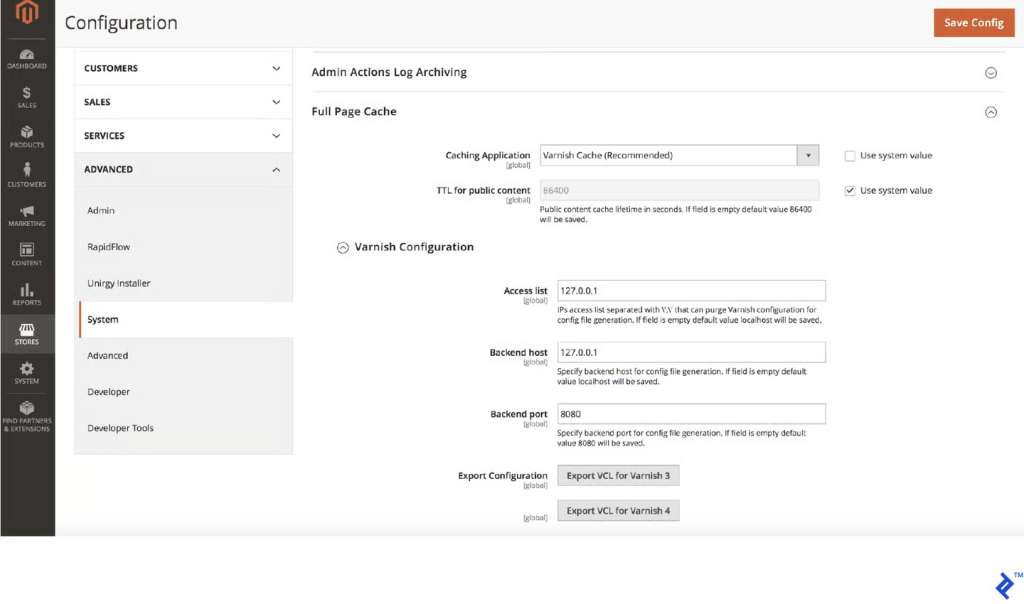
Magento’s built-in full page cache uses the file system, which is far slower than Varnish. Varnish is an HTTP reverse proxy that stores fully rendered HTML in server RAM. When a user requests a cached page, Varnish delivers it without involving PHP or the database at all.
The practical difference is significant. An uncached Magento page may take 2–5 seconds to generate. The same page through Varnish takes under 100 milliseconds. That improvement in Time to First Byte is the foundation on which all other optimizations rest.
Configure Magento to use Varnish under Stores > Configuration > Advanced > System > Full Page Cache. Target a cache hit rate above 90% for guest traffic.
4.2 The cacheable=”false” Trap
One of the most damaging mistakes in Magento development is adding cacheable=”false” to a block in XML layout files. This attribute does not just exclude that one block from cache, it marks the entire page as uncacheable — meaning no visitor ever gets a cached version of that page.
A single misplaced attribute on a category page template can effectively disable full page caching across your entire catalog. Audit all extensions and custom code for this attribute and work with your team to replace it with proper ESI (Edge Side Includes) handling.
4.3 Redis for Cache and Sessions
Configure Redis for two separate purposes. For application cache storage — Redis replaces file-based storage for Magento’s configuration data, layout cache and block output — reading from memory is orders of magnitude faster than reading from disk. For session storage — Redis eliminates the I/O bottlenecks and race conditions that file-based sessions create under concurrent load.
Use separate Redis databases for your default cache, full page cache and sessions. When they share the same pool, session writes can evict cached data unpredictably.
4.4 Enable All Native Cache Types
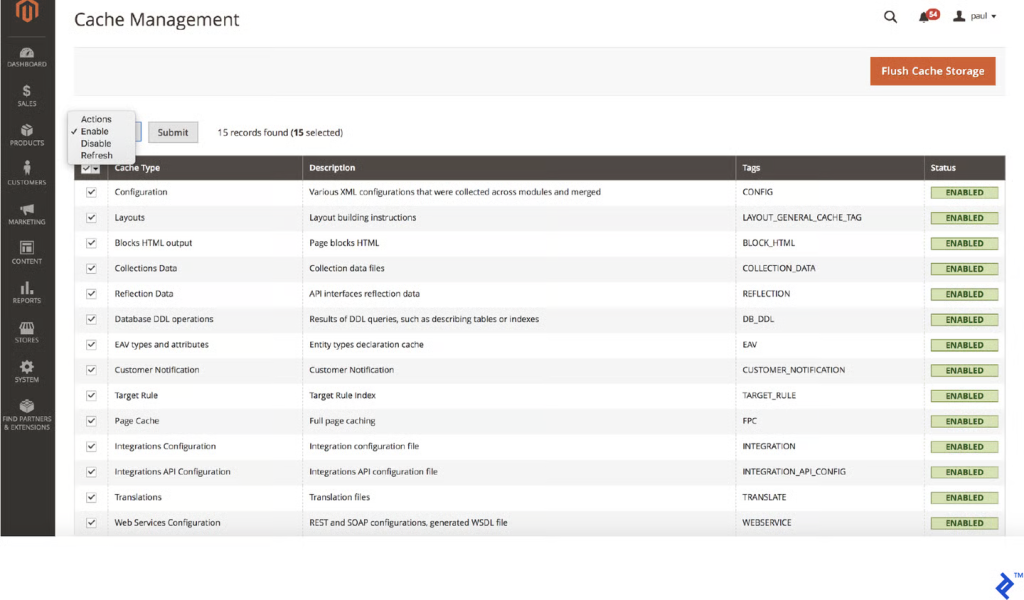
Navigate to System > Tools > Cache Management in your admin panel. Every cache type listed Configuration — Layouts — Block HTML — Collections — Full Page Cache and others should be enabled and showing green. This takes two minutes and is one of the most commonly overlooked settings on inherited stores.
5. Magento Application Configuration
5.1 Production Mode Is Non-Negotiable
Magento runs in three modes. Developer mode disables caching — regenerates static files on every request and is extremely slow by design. Production mode enables all caches — serves pre-generated files and is the only appropriate mode for a live store.
Check your current mode and change it via CLI if needed. You would be surprised how many live stores are running in developer or default mode and it is often the single largest cause of poor performance.
5.2 Static Content Deployment
Every production release should include a static content deployment step that pre-generates all theme CSS, JavaScript, fonts, and images. This ensures assets are served from cache immediately rather than being generated on demand when the first visitor hits a page. Run it for every locale your store serves.
5.3 Indexer Configuration
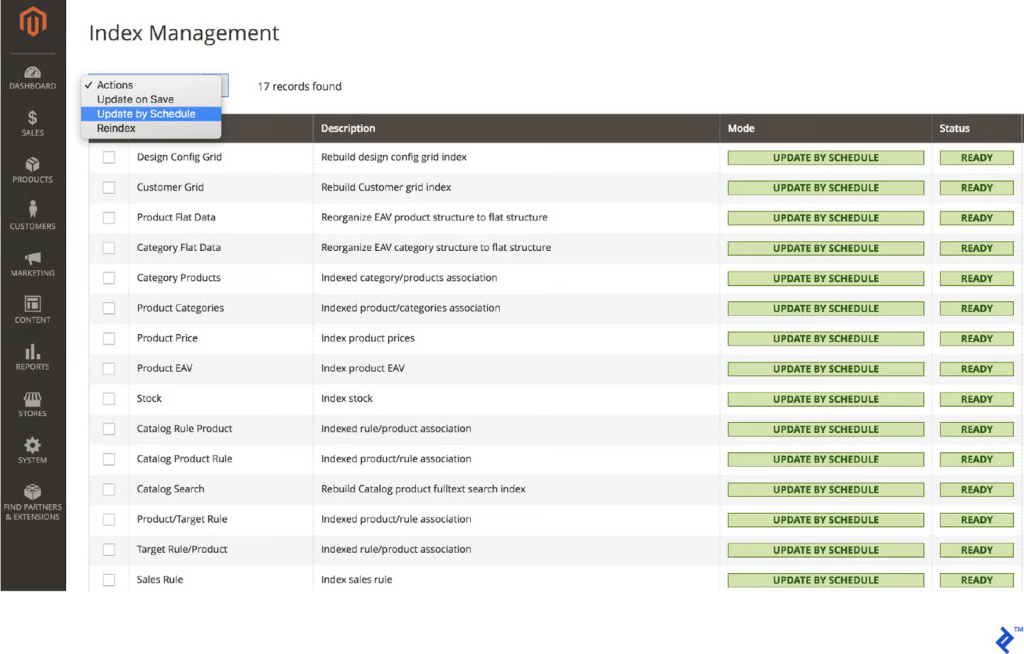
Magento’s indexers update product prices, category assignments and search data. When set to “Update on Save” (the older default), they run every time you save a product, which can lock database tables and slow down admin operations.
Switch all indexers to Update by Schedule under System > Index Management. This moves the work to a background cron job during off-peak hours. Magento 2.4.8 defaults new installations to schedule-based indexing, but upgraded stores should verify this manually.
6. Frontend Asset Optimization
6.1 Minification and Merging
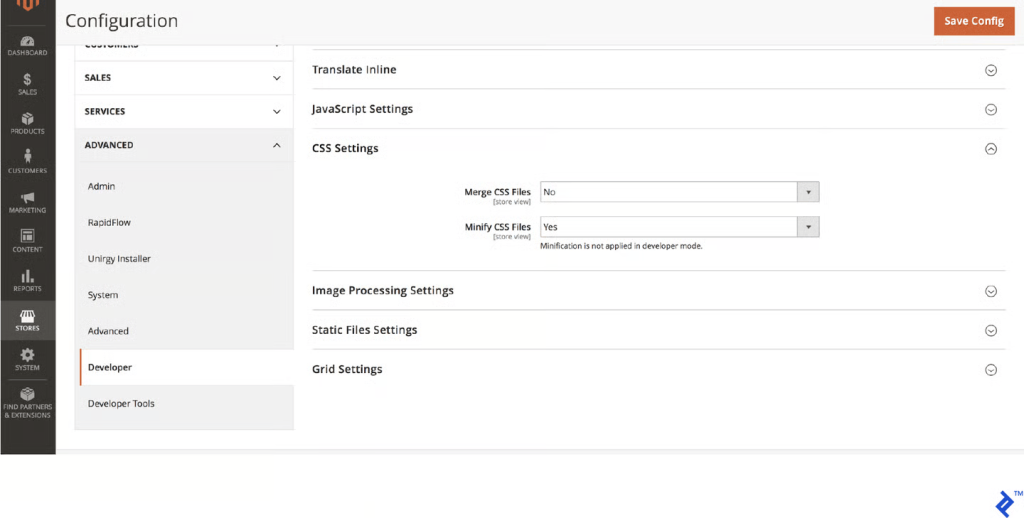
Minification removes whitespace and comments from CSS and JavaScript files, reducing their size by 30–50% with no functional change. Enable it under Stores > Configuration > Advanced > Developer. Always enable minification in production.
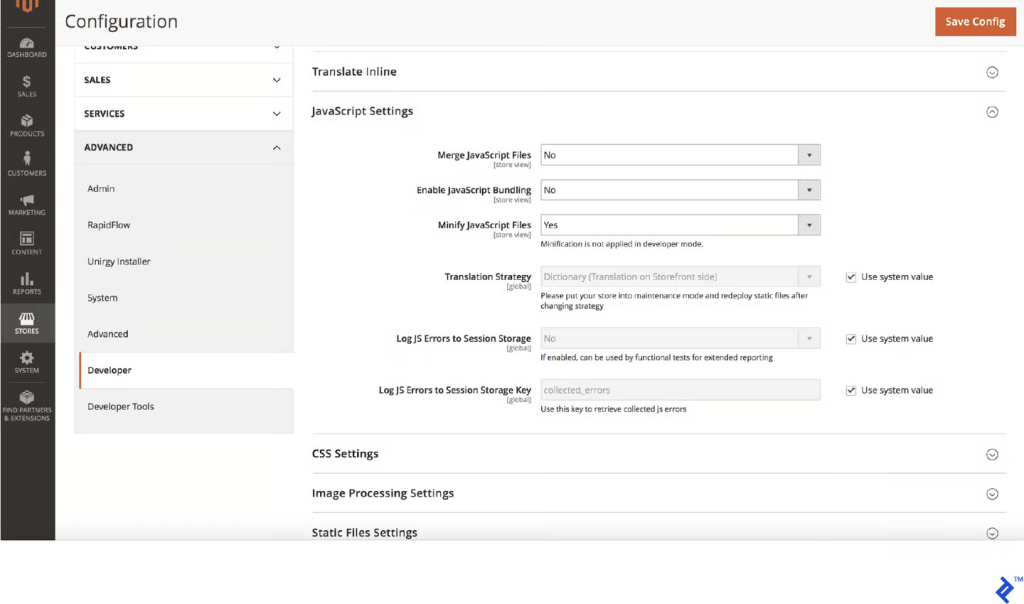
Merging combines multiple files into one, which was clearly beneficial under HTTP/1.1. With HTTP/2 — which loads multiple files simultaneously, merging can actually slow things down by creating one large file that blocks rendering. Test both configurations on your specific store and choose the faster one.
Magento’s built-in JavaScript Bundling is best kept disabled, in practice it tends to create oversized bundle files that hurt more than they help.
6.2 JavaScript Loading
JavaScript loaded in the <head> blocks the browser from rendering your page while those scripts download and execute. Moving non-critical scripts toward the bottom of the page or loading them with defer or async attributes — lets the browser paint content immediately while JavaScript loads in the background. Magento includes a “Move JS to Bottom” option that consistently improves First Contentful Paint scores by 10–15%.
6.3 Critical CSS
When a browser loads your page, it blocks rendering until all CSS is downloaded. Critical CSS extracts only the styles needed for above-the-fold content, inlines them directly in the HTML and defers the full stylesheet to load asynchronously. The result is that users see content almost immediately. Magento 2.3+ includes a native Critical CSS option in Developer settings.
6.4 Web Font Optimization
Browsers will not render text until custom fonts are downloaded — causing what is known as a Flash of Invisible Text. Preloading critical fonts in the document <head> starts the download earlier. Adding font-display: swap to font-face declarations ensures text shows immediately with a fallback then swaps to your custom font once available. Only load the font weights and styles you actually use.
7. Image Optimization
Images typically account for 50–70% of total page weight. No other optimization category offers more return for the effort.
7.1 Right-Size Your Images
Never serve images larger than they will be displayed. A product image shown at 400 pixels wide on screen does not need to be a 1,400 pixel file. The browser resizes it visually but still downloads the full version. Configure Magento’s image output dimensions in your theme’s view.xml file to match actual display sizes.
7.2 Use Modern Image Formats
WebP delivers 25–35% better compression than JPEG and PNG at equivalent visual quality and is supported by all modern browsers. Converting your images to WebP is one of the highest-impact image optimizations available. Use the HTML <picture> element to serve WebP as the primary format with JPEG as a fallback for older browsers.
7.3 Implement Lazy Loading
Lazy loading defers images below the fold until the user scrolls near them. There is no reason to download all 30 product images on a category page when only 6 are visible at load time. Modern browsers support native lazy loading through a simple loading=”lazy” attribute on image tags. Magento 2.4.x includes this natively.
Always pair lazy loading with explicit width and height attributes on image tags. Without these, the browser cannot reserve space before images load, causing layout shifts that hurt your CLS score.
7.4 Compress Images Before Uploading
JPEG images at 80–85% quality are visually indistinguishable from 100% exports but can be 60–70% smaller. Tools like TinyPNG, Squoosh, and ImageOptim make batch compression straightforward. Several Magento extensions integrate compression utilities directly into the image upload workflow.
8. Database Optimization
As your store ages, the database quietly becomes a performance bottleneck through accumulated data and suboptimal configuration.
8.1 Clean Up Log and Quote Tables
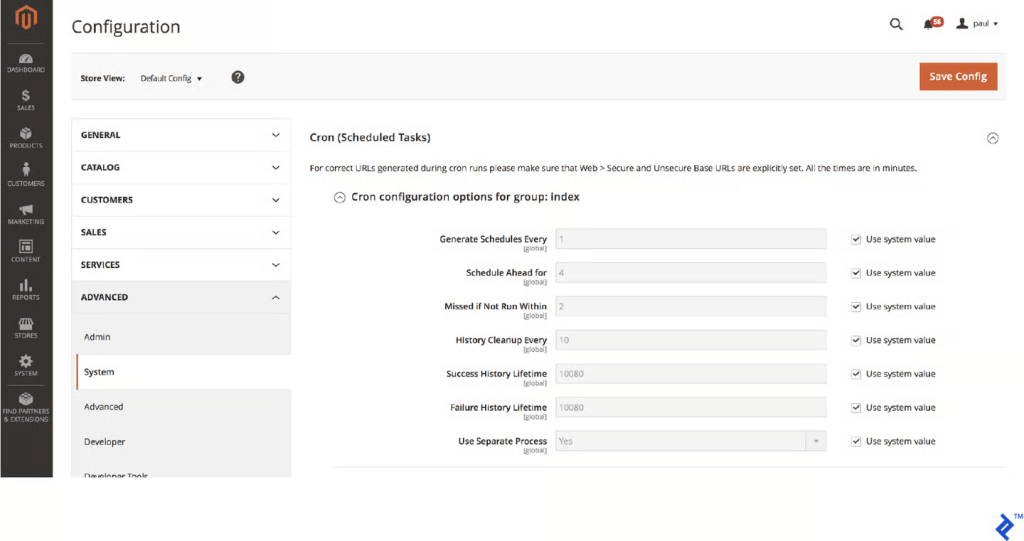
Magento continuously accumulates visitor log data, abandoned cart records and session data. Over time, these tables can grow to millions of rows — slowing the queries that touch them. Schedule automated cleanup routines to purge records older than 30–60 days. Magento provides built-in log cleaning under Stores > Configuration > Advanced > System and CLI commands for cron-based automation.
8.2 Tune Your Database Configuration
The most impactful database setting for Magento is innodb_buffer_pool_size, which controls how much of your database is held in RAM. Set it to 70–80% of your available database server RAM to keep frequently accessed tables and indexes in memory and minimize disk reads.
8.3 Use OpenSearch for Catalog Search
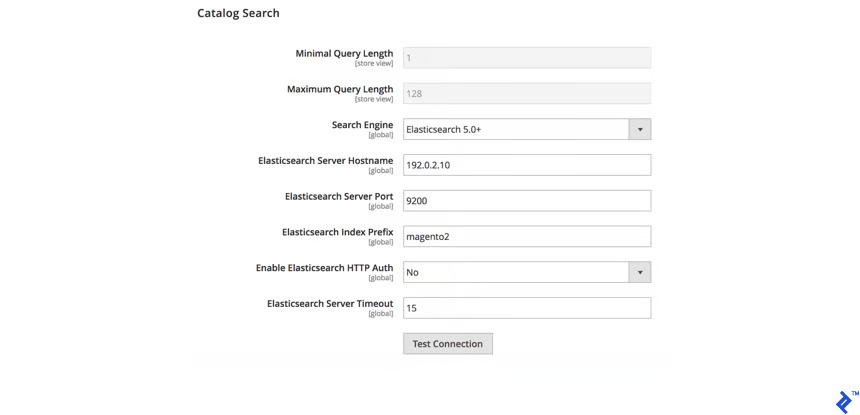
MySQL-based catalog search slows progressively as your product count grows. OpenSearch (required in Magento 2.4.8+ replacing Elasticsearch) is a dedicated search engine that returns results in milliseconds even across very large catalogs with far richer functionality including autocomplete, faceted filtering and relevance ranking.
9. Third-Party Extension Audit
Poorly optimized extensions are the most common cause of slow Magento stores that are otherwise well-configured. Every extension adds code that runs on every request — potentially adds database queries, loads assets on pages that do not need them and may interact badly with caching.
9.1 How Extensions Break Performance
The most damaging issue is adding the cacheable=”false” attribute in layout XML which as covered in Section 4.2 removes entire page templates from full page cache. Extensions may also load JavaScript and CSS globally on every page type even when their functionality is only needed in one place. Some add numerous database queries per page with no caching of their own.
9.2 How to Find the Offenders
Tools like Blackfire.io produce detailed PHP call graphs showing exactly which modules consume the most execution time. New Relic APM provides similar profiling with additional production monitoring capabilities. A simpler diagnostic is to disable extensions one by one in a staging environment and benchmark after each — a measurable TTFB improvement when an extension is off tells you exactly what to address.
9.3 Clean Up Ruthlessly
For every installed extension — ask honestly: Is this actively providing business value? If not, fully uninstall it, not just disable it. A disabled extension’s code and event observers often remain active. Fully removing it via Composer is the only way to ensure it contributes no overhead.
10. Content Delivery Network (CDN)
A CDN distributes your static assets, images, CSS, JavaScript, fonts , across servers worldwide — serving them from the node geographically nearest to each user.
10.1 Why a CDN Matters
Without a CDN, every static file makes a round trip to your origin server. For users geographically distant from your hosting location — this adds meaningful latency to every asset on every page. A CDN eliminates this by serving files from edge nodes that may be hundreds rather than thousands of kilometers away.
10.2 CDN Options for Magento
- Cloudflare is the most popular choice for Magento stores. The free tier is genuinely useful, providing CDN alongside DDoS protection and WAF capabilities.
- Fastly is the native CDN for Adobe Commerce Cloud and offers the highest performance for enterprise deployments.
- AWS CloudFront integrates naturally with stores hosted on AWS infrastructure.
Configure your CDN in Magento under Stores > Configuration > General > Web > Base URLs setting your static and media file URLs to point to your CDN domain.
11. Core Web Vitals: Targeted Fixes
11.1 Improving LCP
Preload your LCP image — typically your hero banner or main product photo by adding a <link rel=”preload”> tag in the document <head>. This tells the browser to start fetching it immediately, before processing the rest of the page’s resources. Also ensure your server TTFB is under 600 milliseconds; poor TTFB delays LCP directly because the browser cannot begin downloading images until HTML is received.
11.2 Improving INP
INP is primarily a JavaScript problem. When scripts are executing on the browser’s main thread, the browser cannot respond to user interactions. Defer third-party marketing scripts, chat widgets, heatmap tools and A/B testing libraries to load after primary content renders. Within your own code, debounce expensive event handlers on search inputs, filters and scroll listeners.
11.3 Improving CLS
Images without specified dimensions are the biggest cause of layout shifts — when the browser does not know an image’s size before it loads, it cannot reserve the correct space. Add explicit width and height attributes to every image tag. Promotional banners injected dynamically after page load should either be rendered server-side or placed in fixed-height containers that do not push content around.
12. Advanced Techniques for High-Performance Stores
For stores that have implemented all the foundational optimizations and want to push further, these approaches represent the next frontier of Magento performance.
The Hyvä Theme: The Most Impactful Frontend Upgrade Available
If you are willing to invest in a theme migration, Hyvä is the most significant frontend performance advancement the Magento ecosystem has seen in years. Magento’s default Luma theme is built on RequireJS, KnockoutJS and jQuery — a heavy combination that typically generates 200 or more HTTP requests and several megabytes of JavaScript on a standard category page.
Hyvä replaces this stack entirely with Alpine.js for interactivity and Tailwind CSS for styling. The results are dramatic: stores migrating from Luma to Hyvä routinely see their request counts fall from the 200-plus range into single or low double digits and their Google PageSpeed Insights scores climb from the 20 to 40 range into the 80 to 100 range for mobile.
As of November 2025, the core Hyvä theme is free and open source. Hyvä Checkout and Hyvä UI remain separate paid products. The practical consideration before migrating is that not all third-party extensions are Hyvä-compatible out of the box , audit your extension dependencies carefully before committing.
Headless Commerce and PWA Frontends
For stores where performance is a top-tier priority and budget is available, a headless commerce architecture decouples the Magento backend from the frontend entirely. The store’s UI is built as a separate application, typically using a React or Vue.js framework with server-side rendering — that communicates with Magento through its GraphQL API.
Headless frontends can achieve PageSpeed scores of 90 and above because they are engineered from the ground up with performance as a design constraint using modern JavaScript tooling that was built after performance optimization became a priority.
Magento’s official PWA Studio provides a framework for building Progressive Web App frontends on Magento. PWAs offer additional benefits including offline capability through service worker caching, push notification support, and an app-like navigation experience that can significantly improve perceived performance for returning visitors.
The tradeoff is substantial complexity. Headless commerce requires specialized development skills, more complex deployment infrastructure and ongoing coordination between the frontend and backend codebases. For most stores, a well-optimized traditional Magento frontend especially with Hyvä — is a more practical and cost-effective path.
13. Monitoring and Long-Term Maintenance
Performance is not a one-time project. Every new extension, every code deployment, and every growing database table is a potential regression.
13.1 Build a Monitoring Routine
- Google Search Console (Core Web Vitals report) — review monthly for real-user data on failing pages.
- Synthetic monitoring (Pingdom, Datadog) — automated TTFB alerts catch cache failures and database lock issues before users notice.
- APM tooling (New Relic, Blackfire) — run quarterly profiling audits and use historical transaction data to pinpoint when regressions were introduced.
13.2 Test After Every Deployment
Run PageSpeed Insights before and after every significant change — extension installs, theme updates, Magento version upgrades and major content changes. A new extension can silently bypass Varnish cache. A theme update can introduce a render-blocking script. Consistent pre- and post-deployment testing is the only way to catch these regressions early.
13.3 Schedule Regular Database Maintenance
Set up automated cron tasks to run during off-peak hours: log table cleanup, purging of abandoned cart records older than 60 days and cache warming after deployments. Keeping your database lean is ongoing work, not a one-time cleanup.
Quick Reference Checklist
Server and Infrastructure
- Hosting is VPS, dedicated or cloud (not shared)
- PHP 8.3 or 8.4 installed
- Nginx with PHP-FPM configured
- Varnish Cache installed and running
- Redis configured for cache and sessions separately
- OpenSearch running (required for Magento 2.4.8+)
- HTTP/2 or HTTP/3 enabled
- Gzip or Brotli compression enabled
- innodb_buffer_pool_size set to 70–80% of database RAM
- PHP OPcache allocated sufficient memory
Magento Configuration
- Store running in Production Mode
- Static content deployment run on latest release
- All cache types enabled in Cache Management
- Full Page Cache set to Varnish (not Built-in)
- Indexers set to Update by Schedule
- Cron job properly configured and running
Frontend Assets
- CSS and JS minification enabled
- JS/CSS merge setting tested and optimized
- JS Bundling disabled
- Move JS to Bottom enabled
- Critical CSS enabled
- Web fonts preloaded and using font-display: swap
Images
- Images right-sized for display dimensions
- WebP format enabled with JPEG fallback
- Lazy loading enabled for below-fold images
- All images have explicit width and height attributes
- Images compressed before upload
Database
- Log tables cleaned on automated schedule
- Abandoned quote records purged regularly
- Database configuration tuned
Extensions
- All unused extensions fully uninstalled
- cacheable=”false” usage audited across all extensions
- Extension performance profiled with Blackfire or New Relic
CDN
- CDN configured for static and media files
- CDN base URLs set in Magento admin
Core Web Vitals
- LCP under 2.5 seconds (LCP image preloaded)
- CLS 0.1 or lower (image dimensions specified)
- INP under 200 milliseconds (third-party scripts deferred)
Monitoring
- Google Search Console Core Web Vitals reviewed monthly
- Synthetic monitoring configured with TTFB alerts
- PageSpeed tested before and after every significant deployment
Final Thoughts
A fast Magento 2 store is achievable , but it requires working through each layer systematically. Start with your server and hosting. Add Varnish and Redis. Switch to Production Mode. Then work progressively through your frontend assets, images, database, and extensions.
The stores that stay fast treat performance as an ongoing discipline rather than a one-time project. Monitor consistently, test after every change, and audit your extensions regularly.
If you need expert help with a Magento 2 performance audit or optimization project, the Bemeir team is ready to help. Get in touch with us to talk through what is holding your store back.
Frequently Asked Questions
1. Why is Magento 2 slow by default?
Magento 2 is built for flexibility and enterprise complexity, not speed out of the box. Its heavy frontend stack, database activity, and modular architecture can slow performance if caching, hosting, and configuration aren’t properly optimized.
2. What is the single biggest performance improvement in Magento?
Full-page caching with Varnish is usually the most impactful optimization. It serves pre-rendered pages directly from memory, drastically reducing server load and improving Time to First Byte (TTFB), especially for guest users.
3. How important is hosting for Magento speed?
Hosting is foundational. Magento should run on VPS, dedicated, or cloud infrastructure with proper resource allocation. Key components like PHP 8.x, Nginx, Redis, and OpenSearch are essential for maintaining consistent performance under load.
4. What are Core Web Vitals and why do they matter?
Core Web Vitals are Google’s real-user performance metrics: LCP (load speed), INP (responsiveness), and CLS (visual stability). They directly affect SEO rankings and user experience, making them critical for ecommerce performance and conversions.
5. How do images impact Magento performance?
Images often make up the majority of page weight. Without proper compression, resizing, lazy loading, and modern formats like WebP, they can significantly slow down load times—especially on mobile networks.
6. Can third-party extensions slow down Magento?
Yes. Extensions can add unnecessary database queries, load extra scripts site-wide, or even disable caching if poorly built. Regular audits and removing unused extensions are essential for maintaining performance.
7. What is the role of Redis in Magento optimization?
Redis improves performance by storing cache and session data in memory instead of on disk. This reduces latency, improves concurrency handling, and helps Magento handle traffic spikes more efficiently.
8. Is ongoing maintenance necessary after optimization?
Absolutely. Performance is not a one-time task. Every new extension, deployment, or content update can impact speed. Continuous monitoring, testing, and periodic audits are required to keep Magento stores fast over time.